

Image
gemini-2.5-flash-image API
Call gemini-2.5-flash-image through Modelflare with the exact model ID shown on this page.
Use the exact model ID gemini-2.5-flash-image. The model field must match this page exactly.
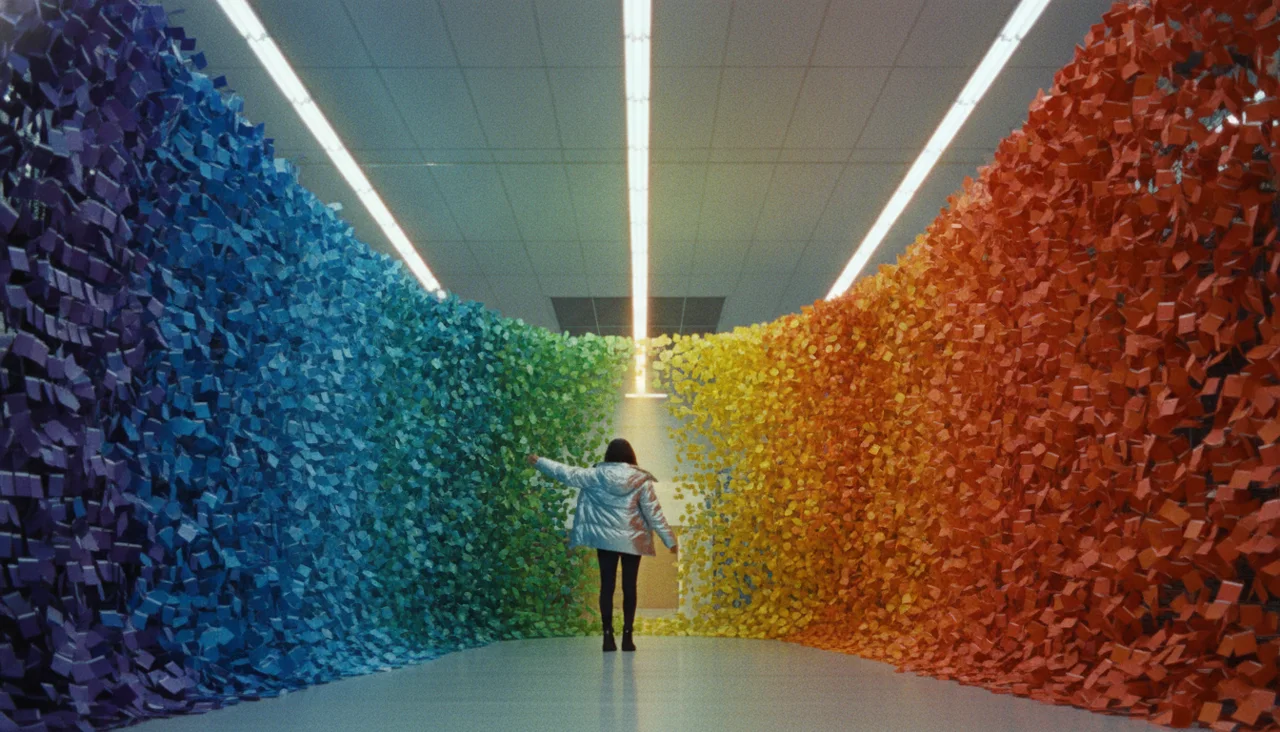
Parameters: size=2Kratio=16:9
Prompt: The paint aisle of a hardware store, fluorescent tubes and rows of colour chip cards. A woman in a chrome puffer coat has just run one hand along the rack. Every card she touched has lifted off its peg and the whole aisle is filling with them, thousands of paper chips turning in the air and sorting themselves into a single smooth gradient wall from deep violet to hot orange. Cold fluorescent ambient, one hard warm slash of light from the end of the aisle. Wide low camera down the aisle, paper edges catching the light, film grain, no text.
{ "contents": [ { "role": "user", "parts": [ { "text": "The paint aisle of a hardware store, fluorescent tubes and rows of colour chip cards. A woman in a chrome puffer coat has just run one hand along the rack. Every card she touched has lifted off its peg and the whole aisle is filling with them, thousands of paper chips turning in the air and sorting themselves into a single smooth gradient wall from deep violet to hot orange. Cold fluorescent ambient, one hard warm slash of light from the end of the aisle. Wide low camera down the aisle, paper edges catching the light, film grain, no text." } ] } ], "generationConfig": { "responseModalities": [ "IMAGE" ], "imageConfig": { "aspectRatio": "16:9", "imageSize": "2K" } }}Authentication and endpoint
Section titled “Authentication and endpoint”Use a Modelflare API key with https://modelflare.dev. The gateway entry point is POST /v1/models/{model}:generateContent.
Authorization: Bearer YOUR_MODELFLARE_API_KEYGenerate an image
Section titled “Generate an image”curl "https://modelflare.dev/v1/models/gemini-2.5-flash-image:generateContent" \ -H "Authorization: Bearer YOUR_MODELFLARE_API_KEY" \ -H "Content-Type: application/json" \ -d '{ "contents": [{"role": "user", "parts": [{"text": "A white cat runs through a neon-lit street in the rain"}]}], "generationConfig": {"responseModalities": ["TEXT", "IMAGE"], "imageConfig": {"aspectRatio": "16:9", "imageSize": "1K"}} }'Request notes
Section titled “Request notes”Gemini image models use native contents and generationConfig; edits send the text instruction and inline_data in the same parts[].
Request parameters
Section titled “Request parameters”Gemini image models use native Gemini generateContent. Put text and reference images in the same contents[].parts[]; images use inline_data. Do not send these models to /v1/images/generations, /v1/images/edits, or OpenAI /v1/responses. The imageSize enum is model-specific and shown below.
| Field | Required | Notes |
|---|---|---|
contents[].parts[].text |
Yes | Text prompt or edit instruction |
contents[].parts[].inline_data |
No | Base64 image data and MIME type |
contents[].parts[].inline_data.mime_type |
No | image/jpeg / image/png / image/webp |
contents[].parts[].inline_data.data |
No | Base64-encoded reference image content |
generationConfig.responseModalities |
Yes | ["IMAGE"] or ["TEXT", "IMAGE"] |
generationConfig.imageConfig.aspectRatio |
No | 1:1 / 4:3 / 3:4 / 16:9 / 9:16 |
generationConfig.imageConfig.imageSize |
No | 1K / 2K / 4K |
Response and input limits
Section titled “Response and input limits”Gemini 2.5 Flash Image supports 1K, 2K, and 4K with 1:1, 4:3, 3:4, 16:9, and 9:16. The official documentation does not publish a reference-image count cap, so the gateway adds no local cap.
Image editing example
Section titled “Image editing example”Put the edit instruction and the reference image in the same contents[].parts[]. inline_data.data is the Base64 image content; do not send Gemini image models to the OpenAI Images or Responses endpoints.
curl "https://modelflare.dev/v1/models/gemini-2.5-flash-image:generateContent" \ -H "Authorization: Bearer YOUR_MODELFLARE_API_KEY" \ -H "Content-Type: application/json" \ -d '{ "contents": [{"role": "user", "parts": [ {"text": "Keep the subject and lighting, but replace the background with a misty pine forest."}, {"inline_data": {"mime_type": "image/jpeg", "data": "BASE64_IMAGE_DATA"}} ]}], "generationConfig": {"responseModalities": ["TEXT", "IMAGE"], "imageConfig": {"aspectRatio": "1:1", "imageSize": "1K"}} }'Response shape
Section titled “Response shape”Read candidates[].content.parts[]; do not assume every part is an image because the response may contain text and image parts together.
| Field | Notes |
|---|---|
candidates[].content.parts[].inline_data |
Generated image MIME type and Base64 data |
candidates[].content.parts[].text |
Text caption returned when TEXT was requested |
candidates[].finishReason |
Completion or safety reason |
usageMetadata |
Input/output token usage when returned by the service |
Modelflare preserves the native Gemini response shape for gemini-2.5-flash-image and persists usable image parts.
Errors and failed tasks
Section titled “Errors and failed tasks”Field errors, size/ratio limits, and safety refusals from the native Gemini request remain Gemini-compatible error responses. The gateway does not rewrite them as OpenAI Images responses.
Supported scope
Section titled “Supported scope”This page covers Modelflare model generation and editing calls. Search or map enrichment, voice management, and element-library management are resource APIs outside this public model-call surface and are not required request fields.
Pricing and billing
Section titled “Pricing and billing”This model uses per-call billing. See the model pricing page for the current customer price, reference list price, and complete specification.
Media contract · v1
Official source: Google
Contract parameters
| Intent field | Control | Options |
|---|---|---|
size | select | 1K / 2K / 4K |
ratio | select | 1:1 / 4:3 / 3:4 / 16:9 / 9:16 |
Supported capability
allowed_values·size· 1K, 2K, 4Kallowed_values·ratio· 1:1, 4:3, 3:4, 16:9, 9:16
Structured request example
text
Intent
{
  "prompt": "A red paper kite over a quiet harbour at dusk.",
  "ratio": "1:1",
  "size": "1K"
}
Provider request
{
  "contents": [
    {
      "parts": [
        {
          "text": "A red paper kite over a quiet harbour at dusk."
        }
      ],
      "role": "user"
    }
  ],
  "generationConfig": {
    "imageConfig": {
      "aspectRatio": "1:1",
      "imageSize": "1K"
    },
    "responseModalities": [
      "TEXT",
      "IMAGE"
    ]
  },
  "systemInstruction": {
    "parts": [
      {
        "text": "Generate an image for the user's request. If details are missing, choose reasonable defaults and still return an image. Do not ask clarifying questions."
      }
    ]
  }
}
reference
Intent
{
  "prompt": "A red paper kite over a quiet harbour at dusk.",
  "ratio": "1:1",
  "size": "1K"
}
Provider request
{
  "contents": [
    {
      "parts": [
        {
          "text": "A red paper kite over a quiet harbour at dusk."
        },
        {
          "inline_data": {
            "data": "AAAA",
            "mime_type": "image/png"
          }
        }
      ],
      "role": "user"
    }
  ],
  "generationConfig": {
    "imageConfig": {
      "aspectRatio": "1:1",
      "imageSize": "1K"
    },
    "responseModalities": [
      "TEXT",
      "IMAGE"
    ]
  },
  "systemInstruction": {
    "parts": [
      {
        "text": "Generate an image for the user's request. If details are missing, choose reasonable defaults and still return an image. Do not ask clarifying questions."
      }
    ]
  }
}