

图片
gemini-3.1-flash-lite-image API
通过 Modelflare 使用 gemini-3.1-flash-lite-image,使用本页显示的精确模型 ID。
使用精确模型 ID gemini-3.1-flash-lite-image。请求中的模型名必须与本页完全一致。
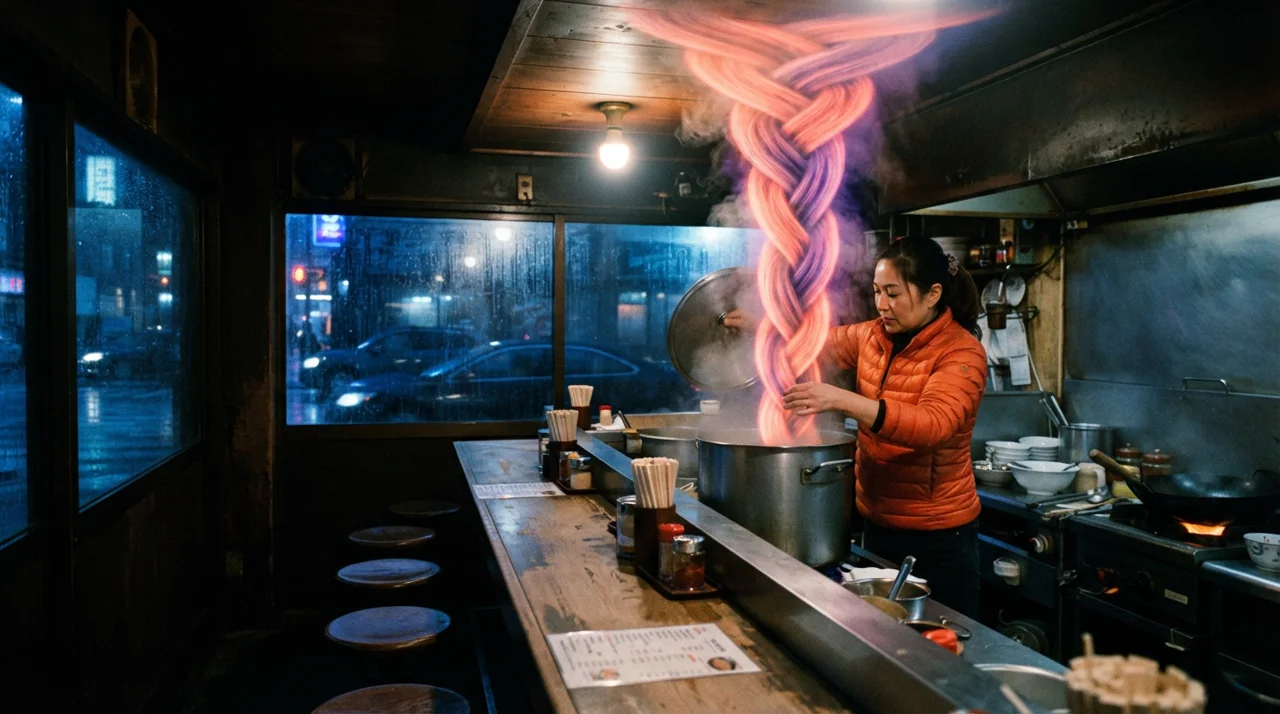
请求参数:ratio=16:9
提示词:A late-night noodle counter, six stools and a steel pass, rain on the window behind. A cook in an orange quilted jacket has just lifted the lid off a stock pot. The steam is not dispersing: it has gathered into solid braided ribbons of coral and ultraviolet that rope up past her face and press flat along the ceiling. One hard tungsten bulb directly overhead, the street outside cold and blue. Wide camera at counter height, real density in the steam, film grain, slight vignette, no text.
{ "contents": [ { "role": "user", "parts": [ { "text": "A late-night noodle counter, six stools and a steel pass, rain on the window behind. A cook in an orange quilted jacket has just lifted the lid off a stock pot. The steam is not dispersing: it has gathered into solid braided ribbons of coral and ultraviolet that rope up past her face and press flat along the ceiling. One hard tungsten bulb directly overhead, the street outside cold and blue. Wide camera at counter height, real density in the steam, film grain, slight vignette, no text." } ] } ], "generationConfig": { "responseModalities": [ "IMAGE" ], "imageConfig": { "aspectRatio": "16:9" } }}使用 Modelflare API Key,通过 https://modelflare.dev 发送请求。网关入口为 POST /v1/models/{model}:generateContent。
Authorization: Bearer YOUR_MODELFLARE_API_KEYcurl "https://modelflare.dev/v1/models/gemini-3.1-flash-lite-image:generateContent" \ -H "Authorization: Bearer YOUR_MODELFLARE_API_KEY" \ -H "Content-Type: application/json" \ -d '{ "contents": [{"role": "user", "parts": [{"text": "一只白猫在雨夜霓虹街道上奔跑"}]}], "generationConfig": {"responseModalities": ["TEXT", "IMAGE"], "imageConfig": {"aspectRatio": "16:9", "imageSize": "1K"}} }'Gemini 图片模型使用原生 contents 和 generationConfig;编辑时在同一 parts[] 中发送文字指令与 inline_data。
Gemini 图片模型使用原生 Gemini generateContent。文本和参考图片都放在同一个 contents[].parts[] 中,图片以 inline_data 提供。不要把这些模型发到 /v1/images/generations、/v1/images/edits 或 OpenAI /v1/responses。不同 Gemini 图片行的 imageSize 枚举以本页表格为准。
| 字段 | 必填 | 说明 |
|---|---|---|
contents[].parts[].text |
是 | 文字提示或编辑指令 |
contents[].parts[].inline_data |
否 | Base64 图片及 MIME 类型 |
contents[].parts[].inline_data.mime_type |
否 | image/jpeg / image/png / image/webp |
contents[].parts[].inline_data.data |
否 | Base64 编码的参考图内容 |
generationConfig.responseModalities |
是 | ["IMAGE"] 或 ["TEXT", "IMAGE"] |
generationConfig.imageConfig.aspectRatio |
否 | 1:1 / 3:2 / 2:3 / 3:4 / 4:3 / 4:5 / 5:4 / 9:16 / 16:9 / 21:9 |
generationConfig.imageConfig.imageSize |
否 | 1K |
响应与输入限制
Section titled “响应与输入限制”Lite 只支持 1K,比例为 1:1、3:2、2:3、3:4、4:3、4:5、5:4、9:16、16:9、21:9。官方文档没有公布参考图数量上限,因此网关不设置额外的本地上限;超出服务限制时返回服务端错误。
图片编辑示例
Section titled “图片编辑示例”编辑请求把文字指令和参考图放在同一个 contents[].parts[] 中。inline_data.data 使用 Base64 图片内容;不要把 Gemini 图片模型改发到 OpenAI Images 或 Responses 入口。
curl "https://modelflare.dev/v1/models/gemini-3.1-flash-lite-image:generateContent" \ -H "Authorization: Bearer YOUR_MODELFLARE_API_KEY" \ -H "Content-Type: application/json" \ -d '{ "contents": [{"role": "user", "parts": [ {"text": "保留主体和光线,把背景改成一片雾中的松林。"}, {"inline_data": {"mime_type": "image/jpeg", "data": "BASE64_IMAGE_DATA"}} ]}], "generationConfig": {"responseModalities": ["TEXT", "IMAGE"], "imageConfig": {"aspectRatio": "1:1", "imageSize": "1K"}} }'读取 candidates[].content.parts[],不要假设每个 part 都是图片;响应可能同时包含文字和图片。
| 字段 | 说明 |
|---|---|
candidates[].content.parts[].inline_data |
生成图片的 MIME 类型和 Base64 数据 |
candidates[].content.parts[].text |
模型返回的文字说明(如果请求了 TEXT) |
candidates[].finishReason |
完成或安全策略原因 |
usageMetadata |
输入/输出 token 用量(服务端返回时) |
Modelflare 保留 gemini-3.1-flash-lite-image 的原生 Gemini 响应结构,并从图片 part 持久化可用的图片结果。
错误与失败任务
Section titled “错误与失败任务”Gemini 原生请求的字段错误、尺寸/比例限制和安全拒绝会以 Gemini 兼容错误响应返回。网关不会把它改写成 OpenAI Images 响应。
本页只覆盖 Modelflare 的模型生成/编辑调用。搜索或地图增强、声音管理、元素库管理等资源型接口不属于本页的公开调用范围,也不需要作为模型请求字段传入。
本模型按 Token 计费。请查看模型价格页查看当前销售价、参考原价和完整规格。
媒体契约 · v1
官方来源: Google
契约参数
| Intent 字段 | 控件 | 选项 |
|---|---|---|
size | select | 1K |
ratio | select | 1:1 / 3:2 / 2:3 / 3:4 / 4:3 / 4:5 / 5:4 / 9:16 / 16:9 / 21:9 |
支持能力
allowed_values·size· 1Kallowed_values·ratio· 1:1, 3:2, 2:3, 3:4, 4:3, 4:5, 5:4, 9:16, 16:9, 21:9
结构化请求示例
text
Intent
{
  "prompt": "A red paper kite over a quiet harbour at dusk.",
  "ratio": "1:1",
  "size": "1K"
}
上游请求
{
  "contents": [
    {
      "parts": [
        {
          "text": "A red paper kite over a quiet harbour at dusk."
        }
      ],
      "role": "user"
    }
  ],
  "generationConfig": {
    "imageConfig": {
      "aspectRatio": "1:1",
      "imageSize": "1K"
    },
    "responseModalities": [
      "TEXT",
      "IMAGE"
    ]
  },
  "systemInstruction": {
    "parts": [
      {
        "text": "Generate an image for the user's request. If details are missing, choose reasonable defaults and still return an image. Do not ask clarifying questions."
      }
    ]
  }
}
reference
Intent
{
  "prompt": "A red paper kite over a quiet harbour at dusk.",
  "ratio": "1:1",
  "size": "1K"
}
上游请求
{
  "contents": [
    {
      "parts": [
        {
          "text": "A red paper kite over a quiet harbour at dusk."
        },
        {
          "inline_data": {
            "data": "AAAA",
            "mime_type": "image/png"
          }
        }
      ],
      "role": "user"
    }
  ],
  "generationConfig": {
    "imageConfig": {
      "aspectRatio": "1:1",
      "imageSize": "1K"
    },
    "responseModalities": [
      "TEXT",
      "IMAGE"
    ]
  },
  "systemInstruction": {
    "parts": [
      {
        "text": "Generate an image for the user's request. If details are missing, choose reasonable defaults and still return an image. Do not ask clarifying questions."
      }
    ]
  }
}