

画像
wan2.7-image API
このページに表示されている正確なモデル ID を使用して、Modelflare を通じて wan2.7-image を呼び出します。
正確なモデル ID wan2.7-image を使用します。モデル フィールドはこのページと正確に一致する必要があります。
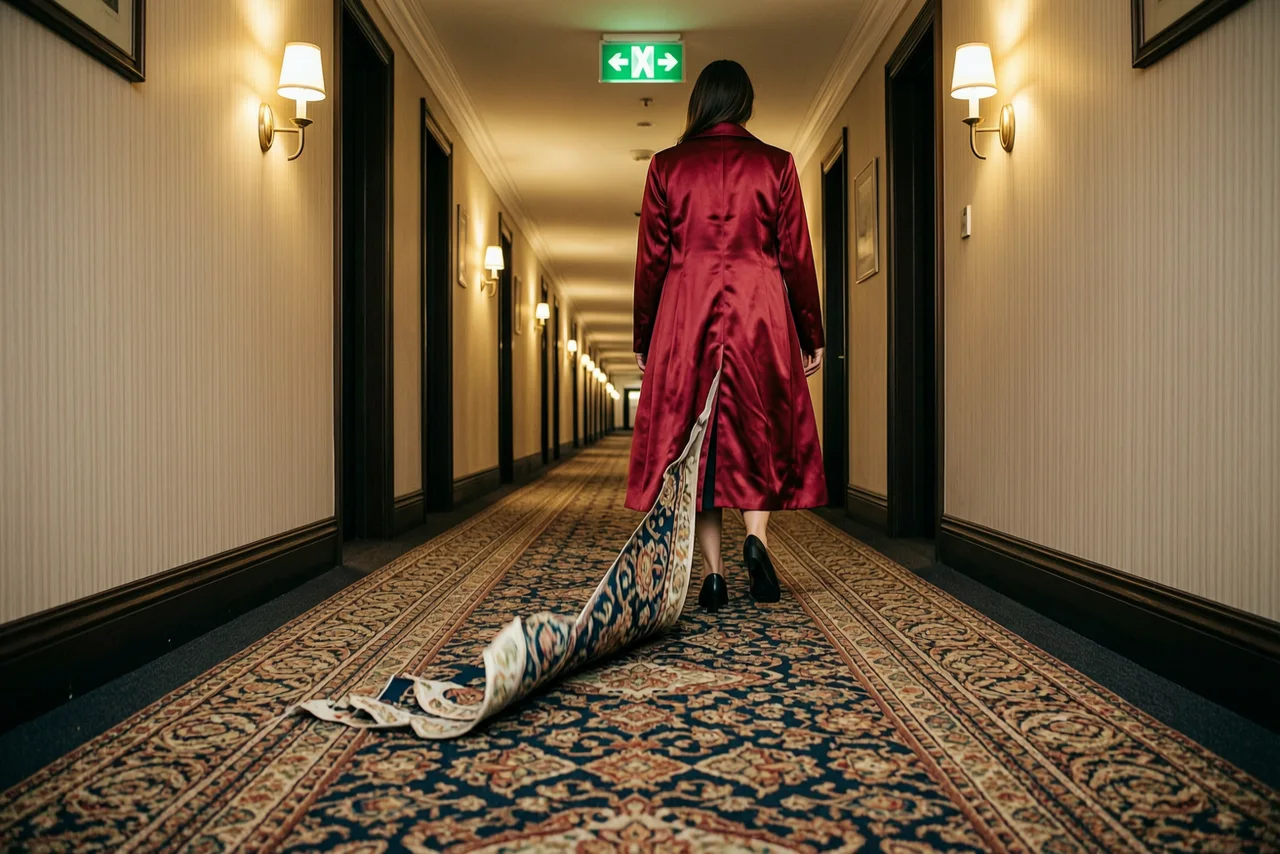
パラメータ: size=1536x1024n=1
プロンプト: A long hotel corridor with a heavily patterned carpet, doors receding into the distance. A woman in a floor-length crimson satin coat has just taken one step forward. Behind her heel the carpet pattern has started to peel up off the floor, lifting away as loose ribbons of colour that keep the print exactly and curl into the air down the length of the hall. One hard green exit sign above, warm wall sconces along the corridor. Wide low camera on the floor line, deep perspective, real cloth weight, film grain, slight vignette, no text.
{ "model": "wan2.7-image", "prompt": "A long hotel corridor with a heavily patterned carpet, doors receding into the distance. A woman in a floor-length crimson satin coat has just taken one step forward. Behind her heel the carpet pattern has started to peel up off the floor, lifting away as loose ribbons of colour that keep the print exactly and curl into the air down the length of the hall. One hard green exit sign above, warm wall sconces along the corridor. Wide low camera on the floor line, deep perspective, real cloth weight, film grain, slight vignette, no text.", "n": 1, "size": "1536x1024"}認証とエンドポイント
Section titled “認証とエンドポイント”https://modelflare.dev/v1 で Modelflare API キーを使用します。ゲートウェイのエントリ ポイントは POST /v1/images/generations です。
Authorization: Bearer YOUR_MODELFLARE_API_KEYcurl https://modelflare.dev/v1/images/generations \ -H "Authorization: Bearer YOUR_MODELFLARE_API_KEY" \ -H "Content-Type: application/json" \ -d '{ "model": "wan2.7-image", "prompt": "A white cat runs through a neon-lit street in the rain", "size": "1024x1024", "n": 1 }'リクエストメモ
Section titled “リクエストメモ”OpenAI 互換の画像モデルは prompt、n、size、および quality を使用します。公式ページに文書化されている場合にのみ編集を使用してください。
リクエストパラメータ
Section titled “リクエストパラメータ”Wan2.7 Image / Pro は同期画像 API を使用します。単純な呼び出しには、OpenAI 互換のフラットな形状を使用します。マルチイメージ、領域編集、連続生成には input.messages と parameters を使用します。 Pro text-to-image はシーケンシャル モード以外で最大 4K をサポートします。標準モデルは最大 2K をサポートします。
| フィールド | 必須 | 注意事項 |
|---|---|---|
model |
はい | wan2.7-image |
prompt |
はい | 生成または編集命令 |
image |
いいえ | 単一画像 URL/Base64; input.messagesは最大9枚まで使用可能 |
input.messages |
いいえ | マルチイメージ、領域編集、および順次生成用のネストされたメッセージ |
size |
いいえ | 1K / 2K; Pro のノンシーケンシャル テキストから画像への変換は 4K もサポートします |
n |
いいえ | 通常世代の場合は 1 ~ 4。連続生成の場合は 1 ~ 12。成功したイメージごとに請求されます |
thinking_mode |
いいえ | 画像供給無し時の思考モード |
watermark |
いいえ | ウォーターマークを入れるかどうか |
parameters.prompt_extend |
いいえ | プロンプト展開、デフォルトは true。 |
parameters.bbox_list |
いいえ | インタラクティブ編集領域ボックス |
parameters.enable_sequential |
いいえ | 順次生成を有効にする |
parameters.color_palette |
いいえ | 合計 100% の 3 ~ 10 進数の色 |
応答および入力制限
Section titled “応答および入力制限”単純な通話にはフラット形状を使用します。 input.messagesとparametersは、マルチ画像、領域編集、連続生成に使用します。最大 9 つの入力イメージがサポートされており、それぞれ 20 MB 未満、エッジあたり 240 ~ 8,000 ピクセル、アスペクト比 1:8 ~ 8:1 です。通常の出力数は 1 ~ 4、シーケンシャル出力数は 1 ~ 12 です。 Pro text-to-image はシーケンシャル モード以外の 4K をサポートしますが、他の組み合わせでは最高 2K になります。
文書化されたワークフローの例
Section titled “文書化されたワークフローの例”Wan2.7 イメージは、フラット形状とネストされた input.messages/parameters 形状の両方をサポートします。ネストされた形状は、複数画像、領域編集、および連続生成に使用します。
マルチ画像編集
curl https://modelflare.dev/v1/images/generations \ -H "Authorization: Bearer YOUR_MODELFLARE_API_KEY" \ -H "Content-Type: application/json" \ -d '{ "model": "wan2.7-image", "input": {"messages": [{"role": "user", "content": [ {"image": "https://example.com/person.png"}, {"image": "https://example.com/background.png"}, {"text": "将图 1 中的人物放入图 2 的场景中"} ]}], "parameters": {"size": "2K", "n": 1, "prompt_extend": true}} }'インタラクティブな領域編集
curl https://modelflare.dev/v1/images/generations \ -H "Authorization: Bearer YOUR_MODELFLARE_API_KEY" \ -H "Content-Type: application/json" \ -d '{ "model": "wan2.7-image", "input": {"messages": [{"role": "user", "content": [ {"image": "https://example.com/room.png"}, {"text": "将选中区域的花瓶替换成红玫瑰"} ]}], "parameters": {"size": "2K", "n": 1, "bbox_list": [[[420, 280, 760, 720]]]}} }'連番画像グループ
curl https://modelflare.dev/v1/images/generations \ -H "Authorization: Bearer YOUR_MODELFLARE_API_KEY" \ -H "Content-Type: application/json" \ -d '{ "model": "wan2.7-image", "input": {"messages": [{"role": "user", "content": [{"text": "生成四张角色一致的季节分镜"}]}]}, "parameters": {"size": "2K", "enable_sequential": true, "n": 4, "watermark": false} }'エラーと失敗したタスク
Section titled “エラーと失敗したタスク”無効なモデル パラメーターは、リクエスト ID を含む 4xx を返します。選択したモデル コントラクトによって定義された応答フィールドとエラー メッセージを使用します。
サポート範囲
Section titled “サポート範囲”このページでは、Modelflare モデルの生成と編集呼び出しについて説明します。検索またはマップのエンリッチメント、音声管理、および要素ライブラリ管理は、このパブリック モデル呼び出しサーフェスの外部にあるリソース API であり、必須のリクエスト フィールドではありません。
価格設定と請求
Section titled “価格設定と請求”通話ごとの課金を採用するモデルです。現在の顧客価格、参考定価、完全な仕様については、モデル価格ページを参照してください。
| モデルID | 違い |
|---|---|
wan2.7-image |
このページに記載されているモデル。 |
メディア契約 · v1
公式ソース: Alibaba Cloud Model Studio
契約パラメータ
| インテントフィールド | コントロール | オプション |
|---|---|---|
size | select | 1K / 2K |
n | number | — |
サポートされる機能
allowed_values·size· 1K, 2Kmax_assets·reference_asset_ids· 9
構造化リクエストの例
text
インテント
{
  "n": 1,
  "prompt": "A red paper kite over a quiet harbour at dusk.",
  "size": "1K"
}
プロバイダーリクエスト
{
  "model": "wan2.7-image",
  "n": 1,
  "prompt": "A red paper kite over a quiet harbour at dusk.",
  "size": "1K"
}
reference
インテント
{
  "n": 1,
  "prompt": "A red paper kite over a quiet harbour at dusk.",
  "size": "1K"
}
プロバイダーリクエスト
{
  "image": "https://example.com/reference.png",
  "model": "wan2.7-image",
  "n": 1,
  "prompt": "A red paper kite over a quiet harbour at dusk.",
  "size": "1K"
}