

이미지
wan2.7-image API
이 페이지에 표시된 정확한 모델 ID를 사용하여 Modelflare를 통해 wan2.7-image을 호출하세요.
정확한 모델 ID wan2.7-image를 사용하세요. 모델 필드는 이 페이지와 정확히 일치해야 합니다.
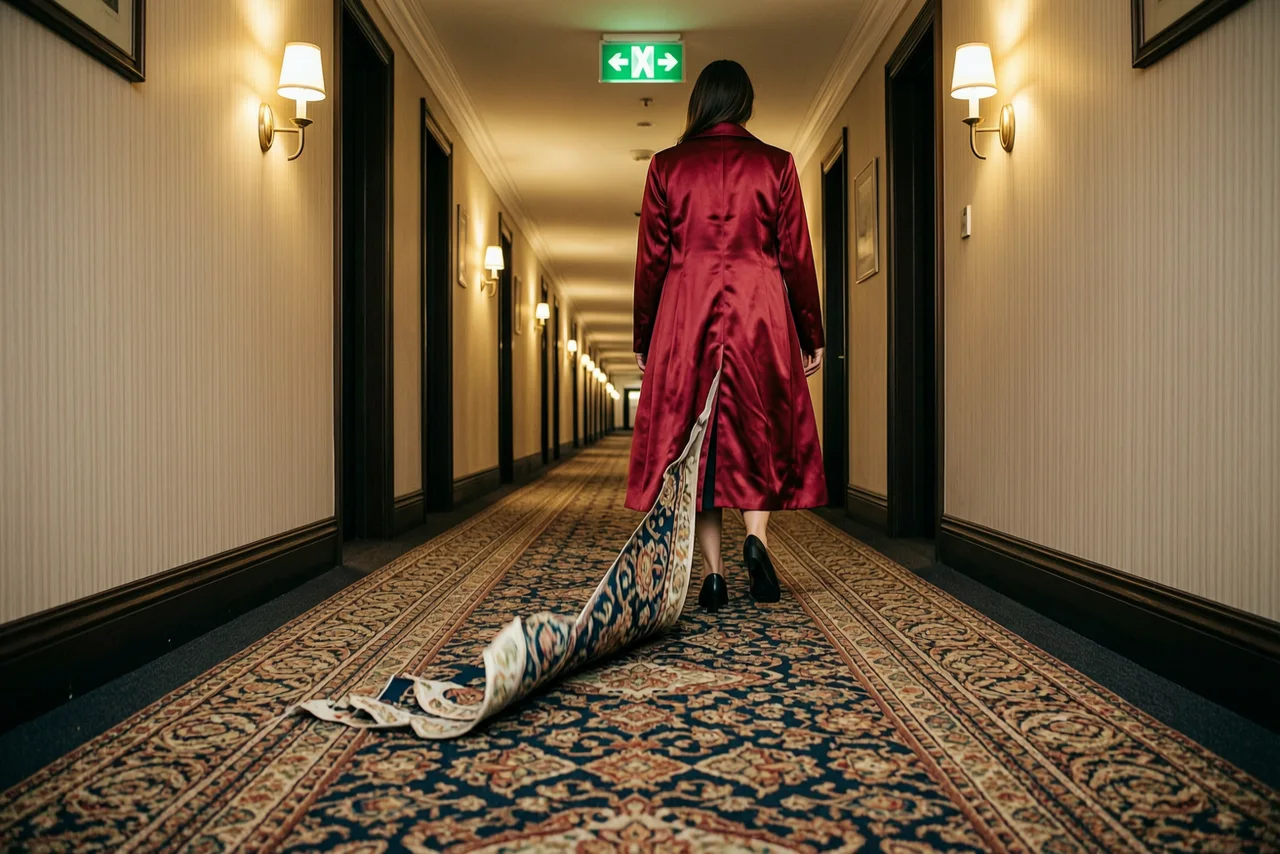
매개변수: size=1536x1024n=1
프롬프트: A long hotel corridor with a heavily patterned carpet, doors receding into the distance. A woman in a floor-length crimson satin coat has just taken one step forward. Behind her heel the carpet pattern has started to peel up off the floor, lifting away as loose ribbons of colour that keep the print exactly and curl into the air down the length of the hall. One hard green exit sign above, warm wall sconces along the corridor. Wide low camera on the floor line, deep perspective, real cloth weight, film grain, slight vignette, no text.
{ "model": "wan2.7-image", "prompt": "A long hotel corridor with a heavily patterned carpet, doors receding into the distance. A woman in a floor-length crimson satin coat has just taken one step forward. Behind her heel the carpet pattern has started to peel up off the floor, lifting away as loose ribbons of colour that keep the print exactly and curl into the air down the length of the hall. One hard green exit sign above, warm wall sconces along the corridor. Wide low camera on the floor line, deep perspective, real cloth weight, film grain, slight vignette, no text.", "n": 1, "size": "1536x1024"}인증 및 엔드포인트
섹션 제목: “인증 및 엔드포인트”https://modelflare.dev/v1과 함께 Modelflare API 키를 사용합니다. 게이트웨이 진입점은 POST /v1/images/generations입니다.
Authorization: Bearer YOUR_MODELFLARE_API_KEY이미지 생성
섹션 제목: “이미지 생성”curl https://modelflare.dev/v1/images/generations \ -H "Authorization: Bearer YOUR_MODELFLARE_API_KEY" \ -H "Content-Type: application/json" \ -d '{ "model": "wan2.7-image", "prompt": "A white cat runs through a neon-lit street in the rain", "size": "1024x1024", "n": 1 }'요청 메모
섹션 제목: “요청 메모”OpenAI 호환 이미지 모델은 prompt, n, size 및 quality를 사용합니다. 공식 페이지에 문서화되어 있는 경우에만 편집을 사용하세요.
요청 매개변수
섹션 제목: “요청 매개변수”Wan2.7 Image/Pro는 동기식 Images API를 사용합니다. 간단한 호출에는 평평한 OpenAI 호환 모양을 사용하세요. 다중 이미지, 영역 편집 및 순차 생성에는 input.messages과 parameters를 사용하십시오. Pro text-to-image는 외부 순차 모드에서 최대 4K를 지원합니다. 표준 모델은 최대 2K를 지원합니다.
| 필드 | 필수 | 노트 |
|---|---|---|
model |
예 | wan2.7-image |
prompt |
예 | 생성 또는 편집 지시 |
image |
아니요 | 단일 이미지 URL/Base64; 최대 9개의 이미지에는 input.messages을 사용하세요. |
input.messages |
아니요 | 다중 이미지, 영역 편집 및 순차 생성을 위한 중첩 메시지 |
size |
아니요 | 1K / 2K; Pro 비순차적 텍스트-이미지 변환은 4K도 지원합니다. |
n |
아니요 | 일반 세대의 경우 1~4; 순차 생성의 경우 1–12; 성공한 이미지당 요금 청구 |
thinking_mode |
아니요 | 이미지가 제공되지 않을 때의 사고 모드 |
watermark |
아니요 | 워터마크 추가 여부 |
parameters.prompt_extend |
아니요 | 프롬프트 확장, 기본값은 true입니다. |
parameters.bbox_list |
아니요 | 대화형 편집 영역 상자 |
parameters.enable_sequential |
아니요 | 순차 생성 활성화 |
parameters.color_palette |
아니요 | 총 백분율이 100%인 3~10개의 HEX 색상 |
응답 및 입력 제한
섹션 제목: “응답 및 입력 제한”간단한 통화에는 플랫 모양을 사용합니다. 다중 이미지, 영역 편집 및 순차 생성에는 input.messages 및 parameters을 사용하십시오. 최대 9개의 입력 이미지가 지원되며 각 이미지는 20MB 미만, 가장자리당 2408,000픽셀, 가로 세로 비율은 1:88:1입니다. 일반 출력 개수는 14이고 순차 출력 개수는 112입니다. Pro text-to-image는 4K 외부 순차 모드를 지원하는 반면 다른 조합은 2K에서 최고를 지원합니다.
문서화된 워크플로우 예시
섹션 제목: “문서화된 워크플로우 예시”Wan2.7 이미지는 평면 모양과 중첩된 input.messages/parameters 모양을 모두 지원합니다. 다중 이미지, 영역 편집 및 순차 생성을 위해 중첩된 모양을 사용합니다.
다중 이미지 편집
curl https://modelflare.dev/v1/images/generations \ -H "Authorization: Bearer YOUR_MODELFLARE_API_KEY" \ -H "Content-Type: application/json" \ -d '{ "model": "wan2.7-image", "input": {"messages": [{"role": "user", "content": [ {"image": "https://example.com/person.png"}, {"image": "https://example.com/background.png"}, {"text": "将图 1 中的人物放入图 2 的场景中"} ]}], "parameters": {"size": "2K", "n": 1, "prompt_extend": true}} }'인터랙티브 영역 편집
curl https://modelflare.dev/v1/images/generations \ -H "Authorization: Bearer YOUR_MODELFLARE_API_KEY" \ -H "Content-Type: application/json" \ -d '{ "model": "wan2.7-image", "input": {"messages": [{"role": "user", "content": [ {"image": "https://example.com/room.png"}, {"text": "将选中区域的花瓶替换成红玫瑰"} ]}], "parameters": {"size": "2K", "n": 1, "bbox_list": [[[420, 280, 760, 720]]]}} }'연속 이미지 그룹
curl https://modelflare.dev/v1/images/generations \ -H "Authorization: Bearer YOUR_MODELFLARE_API_KEY" \ -H "Content-Type: application/json" \ -d '{ "model": "wan2.7-image", "input": {"messages": [{"role": "user", "content": [{"text": "生成四张角色一致的季节分镜"}]}]}, "parameters": {"size": "2K", "enable_sequential": true, "n": 4, "watermark": false} }'오류 및 실패한 작업
섹션 제목: “오류 및 실패한 작업”잘못된 모델 매개변수는 요청 ID와 함께 4xx를 반환합니다. 선택한 모델 계약에 정의된 응답 필드 및 오류 메시지를 사용합니다.
지원 범위
섹션 제목: “지원 범위”이 페이지에서는 Modelflare 모델 생성 및 편집 호출을 다룹니다. 검색 또는 지도 강화, 음성 관리 및 요소 라이브러리 관리는 이 공개 모델 호출 표면 외부의 리소스 API이며 필수 요청 필드가 아닙니다.
가격 및 청구
섹션 제목: “가격 및 청구”이 모델은 통화당 청구를 사용합니다. 현재 고객 가격, 참조 정가 및 전체 사양은 모델 가격 페이지를 참조하세요.
| 모델 ID | 차이점 |
|---|---|
wan2.7-image |
이 페이지에 문서화된 모델입니다. |
미디어 계약 · v1
공식 출처: Alibaba Cloud Model Studio
계약 매개변수
| 인텐트 필드 | 컨트롤 | 옵션 |
|---|---|---|
size | select | 1K / 2K |
n | number | — |
지원되는 기능
allowed_values·size· 1K, 2Kmax_assets·reference_asset_ids· 9
구조화된 요청 예시
text
인텐트
{
  "n": 1,
  "prompt": "A red paper kite over a quiet harbour at dusk.",
  "size": "1K"
}
제공자 요청
{
  "model": "wan2.7-image",
  "n": 1,
  "prompt": "A red paper kite over a quiet harbour at dusk.",
  "size": "1K"
}
reference
인텐트
{
  "n": 1,
  "prompt": "A red paper kite over a quiet harbour at dusk.",
  "size": "1K"
}
제공자 요청
{
  "image": "https://example.com/reference.png",
  "model": "wan2.7-image",
  "n": 1,
  "prompt": "A red paper kite over a quiet harbour at dusk.",
  "size": "1K"
}